> For the complete documentation index, see [llms.txt](https://docs.upsellwp.com/llms.txt). Markdown versions of documentation pages are available by appending `.md` to page URLs; this page is available as [Markdown](https://docs.upsellwp.com/add-ons/buy-more-save-more/mix-and-match-bundle.md).
# Mix And Match Bundle
Learn how to create Mix and Match Bundles in your store using WPBundle.
**Introduction**
The **Mix and Match Bundle** campaign is a promotional strategy designed to provide customers with the flexibility to combine different products from a selected category or range and receive a discount based on their total purchase. This campaign allows customers to choose from a variety of eligible products, empowering them to customize their orders while benefiting from exclusive savings.
This user guide explains creating a Mix and match Bundle using [WPBundle](https://wpbundle.net/)
{% hint style="info" %}
Please make sure that you have already installed and activated the WPBundle plugin. Please note that some of the features explained here are available only in the PRO version.
[**Get WPBundle PRO**](https://wpbundle.net/)
{% endhint %}
**Example Scenarios:**
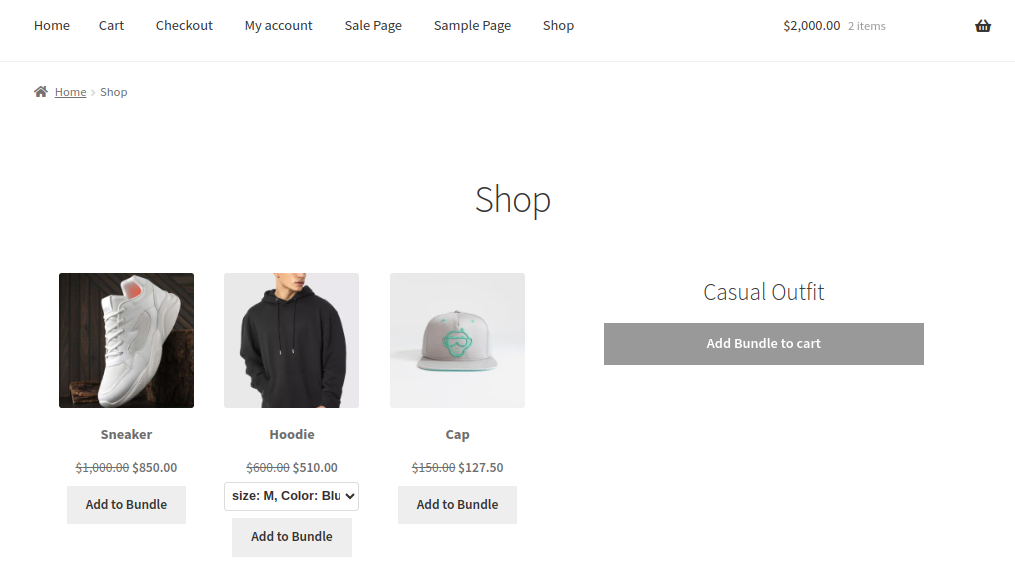
1. A customer selects a Hoodie, cap, and a sneaker from the designated collection. The 15% discount is automatically applied at checkout, allowing the customer to mix and match their favorite pieces to create a complete outfit.
**Creating a Mix and match Bundle.**
* Go to WordPress dashboard -> WPBundle -> Create New Bundle -> Choose "Mix and match Bundle” -> Create Bundle
**Here's a screenshot of the Mix and match Bundle Configuration**
**Details of the Bundle Configuration**
1. Select the products for which you want to make a bundle.
2. Choose the products in filter you want to showcase as bundle products.
3. Enter the discount percentage.
4. Customize your template.
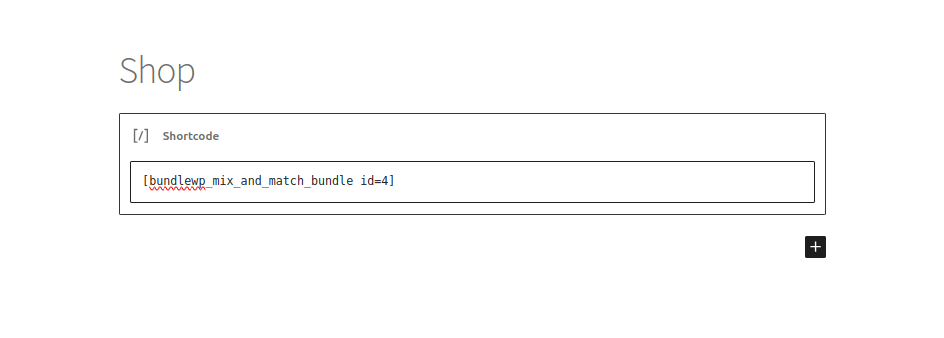
5. Copy the auto generated shortcode.
6. Paste the copied shortcode in your preferred location to display the bundle.
7. Save bundle
**Screenshot of the Mix And Match Bundled products in the shop page.**
{% hint style="info" %}
Please make sure that you have already installed and activated the WPBundle plugin. Please note that some of the features explained here are available only in the PRO version.
Get [ Buy More Save More](https://upsellwp.com/add-ons/buy-more-save-more/) Addon
{% endhint %}
Still Unclear ?
If you need any assistance, please create a [support request](https://wpbundle.net/support/) in our ticket system. We are always happy to assist you :)